
How to Get Transfer PIN from Verizon to Port Your Number
Switching carriers doesn’t mean you have to lose your familiar contact number. If you’re ready to move your mobile service, knowing exactly how to port number from Verizon is the first step toward a successful transition. The process is streamlined by industry regulations, but it hinges on one critical piece of information: your Number Transfer PIN. This authoritative guide, brought to you by Viettel Online, will walk you through exactly how to get transfer pin from Verizon and outline the necessary steps to officially release a Verizon phone number to your new service provider without hassle.
1. How to Port number from Verizon?
The key to porting your number is to start the process with your new carrier. Your new carrier will handle the transfer and communicate with Verizon on your behalf.
Steps for Porting Out:
- Do NOT cancel your Verizon service yet. Your number must remain active for the new carrier to successfully transfer it. The porting process will automatically trigger the cancellation of the line(s) being transferred once it is complete.
- Gather Required Information from Verizon: You will need your:
- Verizon Account Number
- Number Transfer PIN (see Section 2 below)
- Billing Name and Address associated with your Verizon account.
- Start the Transfer with Your New Carrier: Contact your new mobile provider and tell them you want to bring (port) your current number from Verizon. You will provide them with the information gathered in step 2.
- Wait for Completion: Porting a mobile number usually takes 1-3 business days to complete. Do not try to activate your new SIM card until the new carrier confirms the port is finished, or your old Verizon service stops working.
Important Note: Make sure Number Lock (a security feature) is disabled on your Verizon line before starting the port process. You can check this in the My Verizon app or by calling customer service.
2. How to Get Transfer PIN from Verizon?
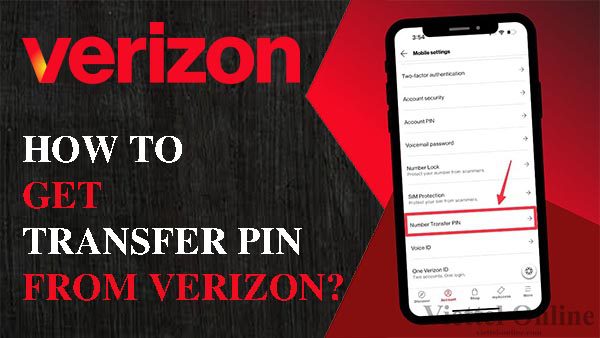
You can get a Verizon transfer PIN by dialing #PORT from the phone you want to transfer, using the My Verizon app, or by going to the My Verizon website. Dialing #PORT sends a text with a link to generate the PIN and account number, while the app and website allow you to find the option in the profile or security settings after logging in. The PIN is valid for seven days after generation.
From your phone
- Dial “#PORT” (or #7678) from the smartphone whose number you want to transfer.
- Press the call button.
- Verizon will send you an automated text message with a link.
- Tap the link, which will take you to a page to generate your PIN.
- Your account number and transfer PIN will be displayed. The PIN is valid for seven days.
From the My Verizon app
- Open the My Verizon app and log in.
- Tap the “Account” tab at the bottom.
- Select “Edit profile & settings”.
- Scroll down to “Number Transfer PIN” and tap it.
- Tap “Generate PIN”. Your PIN and account number will be displayed.
From the My Verizon website
- Go to the Verizon website and sign in to your account.
- Navigate to “My Profile” or “Account”.
- Look for the “Number Transfer PIN” option.
- Select “Generate PIN”. Your PIN and account number will be displayed.
Successfully transferring your mobile service is simpler than many people assume, provided you have the right information. By following the steps outlined in this Viettel Online guide, you now know precisely how to get transfer pin from Verizon and the entire process for how to port number from Verizon. Remember that your new carrier initiates the port-out request, and the most crucial step you take is obtaining your account number and the time-sensitive Number Transfer PIN. Once these details are secured and passed to your new provider, you’ve taken the necessary action to release a Verizon phone number and begin your new service without interruption.

BÀI VIẾT LIÊN QUAN
Gói MIMAX0 Viettel là gì? Cách hủy gói MIMAX0 nhanh nhất
Gói 1N Viettel là gì? Cách đăng ký, tặng và huỷ gói 1N miễn phí
Cách nhận 100k từ VNeID Chính phủ tặng nhân dịp Quốc Khánh 2/9
Đầu số 034 là mạng gì? 0342, 0343, 0344, 0345, 0346, 0347, 0348, 0349 là mạng nào?
Đầu số 033 là mạng gì? 0332, 0333, 0334, 0335, 0336, 0337, 0338, 0339 là mạng nào?
Gọi nội mạng là gì? Gọi liên mạng và gọi ngoại mạng là gì?
Hỗ trợ khách hàng Viettel
My Viettel phiên bản 5.6 hỗ trợ thanh toán VNPAY
SafeMobile – Bảo vệ người dùng an toàn trên không gian mạng
Hướng dẫn xử lý – Modem wifi Viettel bị ngắt kết nối
Danh sách kênh truyền hình Viettel TV360
Wifi Mesh – Giải pháp mở rộng sóng wifi của Viettel
Cách xử lý khi sim điện thoại bị mất sóng